
M3U8 Links Explained: What They Are and How to Play Them

If you have looked inside an IPTV playlist, you have seen addresses ending in .m3u8. These M3U8 links are behind most live TV streams on the internet, from news channels to sports highlights.
This guide explains what an M3U8 link is, how it differs from an M3U playlist, which players can open one, and what to check when a link will not play. It is part of our series on finding IPTV channels through public playlists.
| Attribute | Details |
|---|---|
| Topic | M3U8 links and HLS streams |
| Level | Beginner |
| Devices Covered | PC, Mac, Android, iPhone and smart TVs |
| What You Need | An M3U8 link and a player such as VLC |
In This Guide
What Is an M3U8 Link?
An M3U8 link is the address of a playlist file used by HLS, short for HTTP Live Streaming. HLS is the streaming method Apple created and later published as RFC 8216, and it is now used by almost every live video service.
Instead of sending one big video file, HLS cuts the stream into short segments of a few seconds each. The M3U8 file is a small text list that tells the player which segments to download and in what order. For live TV, the list is updated constantly, so the player keeps fetching new segments. Apple’s HTTP Live Streaming overview describes the same idea from the broadcaster’s side.
The “8” refers to UTF-8. The HLS standard requires playlist files to be encoded in UTF-8, so the .m3u8 extension signals a UTF-8 M3U file.
M3U vs M3U8: What Is the Difference?
The two names look alike, and both are text playlists, but in IPTV they usually play different roles:
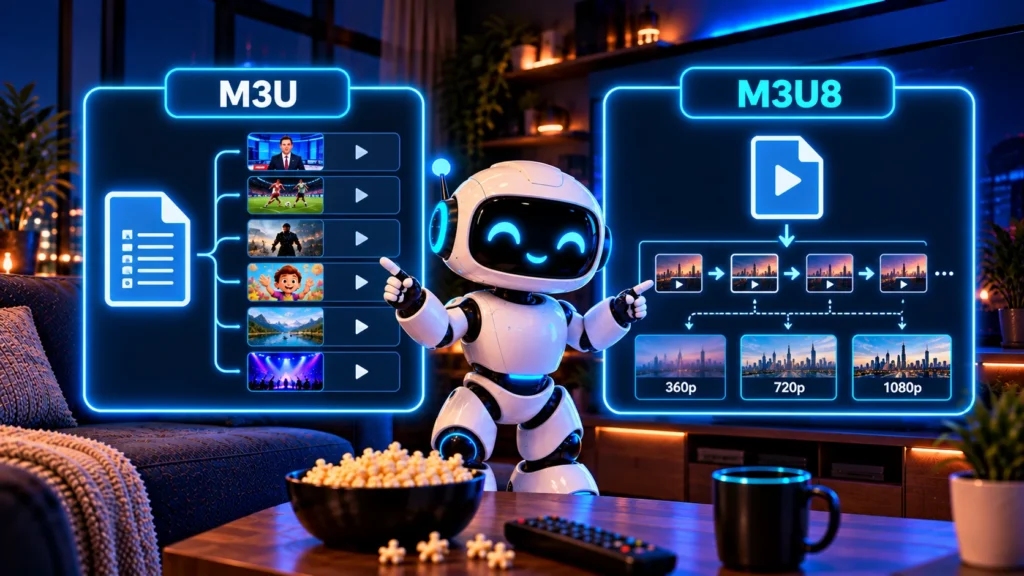
| M3U playlist | M3U8 link | |
|---|---|---|
| Typical use | A list of many channels | One channel’s live stream |
| What it points to | Stream links, one per channel | Video segments or quality levels |
| Contents | Channel names, logos, groups, guide IDs | Segment durations and addresses |
| Example | index.m3u from iptv-org | …/live/playlist.m3u8 |
So an M3U playlist is often a list of M3U8 links. You open the M3U to see all channels, and the player then opens each channel’s M3U8 behind the scenes. Read our guide to the IPTV M3U playlist for more on the playlist side.
What Is Inside an M3U8 File?
There are two kinds of M3U8 files. A master playlist lists the same stream in several qualities:
#EXTM3U
#EXT-X-STREAM-INF:BANDWIDTH=800000,RESOLUTION=640x360
low/index.m3u8
#EXT-X-STREAM-INF:BANDWIDTH=2500000,RESOLUTION=1280x720
mid/index.m3u8
#EXT-X-STREAM-INF:BANDWIDTH=5000000,RESOLUTION=1920x1080
high/index.m3u8
A media playlist lists the actual video segments:
#EXTM3U
#EXT-X-TARGETDURATION:6
#EXT-X-MEDIA-SEQUENCE:2041
#EXTINF:6.0,
segment2041.ts
#EXTINF:6.0,
segment2042.ts| Tag | Meaning |
|---|---|
| #EXTM3U | First line of every extended playlist |
| #EXT-X-STREAM-INF | One quality version of the stream, with its bandwidth |
| #EXT-X-TARGETDURATION | Longest segment length in seconds |
| #EXTINF | Length of the next segment |
This is why HLS adapts so well to your connection. If your internet slows down, the player switches to a lower-quality variant instead of stopping.
Players That Play M3U8 Links
Most modern players handle M3U8 links. Common choices:
- VLC on Windows, Mac, Linux, Android and iPhone. Use Open Network Stream and paste the link. See our guide on how to open M3U in VLC.
- Safari on Mac, iPhone and iPad plays HLS natively. Paste the link into the address bar.
- Dedicated IPTV players on Android, Firestick and smart TVs, which also accept full M3U playlists.
- Web players built on HLS libraries, used by many broadcasters’ own websites.
To test a single link quickly, VLC is the simplest option: Media, then Open Network Stream, paste the M3U8 address and press Play.
Where to Find Legitimate M3U8 Links
You rarely need to hunt for M3U8 links one by one. Public directories already collect them:
- iptv-org playlists. Every channel entry is a stream link, many of them M3U8. Our guide to the iptv-org GitHub project explains the lists.
- Broadcasters’ own players. Many public broadcasters stream live on their websites using HLS.
- Free streaming apps. Services like Pluto TV and Tubi use HLS inside their apps, so you can simply watch there.
Only use links to streams you are allowed to watch. Pulling stream addresses out of paid services or sharing private links can break their terms and copyright law.
Why an M3U8 Link Will Not Play
| Symptom | Likely cause | What to try |
|---|---|---|
| Error right away | Link expired or moved | Get a fresh link from the source playlist |
| Works in browser, not in app | Stream needs headers the app does not send | Use the broadcaster’s own player instead |
| Plays then freezes | Slow or unstable connection | Lower quality or switch to wired internet |
| “Not available in your region” | Geo-blocked stream | Watch a stream licensed for your country |
| Sound but no picture | Codec not supported | Try VLC, which supports more formats |
How to Test an M3U8 Link Quickly
Before adding M3U8 links to a playlist or an app, it helps to check that they actually play. Here is a quick test that takes less than a minute:
- Copy the full link. Make sure it ends in .m3u8 and has no spaces or missing characters.
- Open it in VLC. Go to Media, then Open Network Stream, paste the link and press Play.
- Check the stream details. In VLC, open Tools, then Codec Information (Ctrl+J). You will see the video resolution and codec, which tells you which quality level is playing.
- Let it run for a few minutes. A live stream should keep loading new segments. If it stops after the first few seconds, the link may have expired.
- Try a second player. If VLC fails, test the same link in Safari or another HLS player before deciding the link is broken.
| Result | What it means |
|---|---|
| Plays and keeps going | The link works and the stream is live |
| Plays, then stops | Expired link or unstable source |
| Error right away | Wrong address, removed stream or region block |
| Audio only | The player does not support the video codec |
Testing M3U8 links this way saves time later, because you only add working streams to your playlist instead of fixing broken entries one by one.
Frequently asked questions
What is an M3U8 link?
It is the web address of an HLS playlist. The file tells a video player which short video segments to load, which is how most live streams are delivered online.
How do I play an M3U8 link?
Open VLC, choose Media and then Open Network Stream, paste the link and press Play. Safari and most IPTV players can also open M3U8 links.
What is the difference between M3U and M3U8?
Both are text playlists. M3U8 is UTF-8 encoded and in IPTV usually points to one live stream, while an M3U file usually lists many channels.
Can VLC play M3U8 links?
Yes. VLC supports HLS streams on desktop and mobile. Use the network stream option and paste the URL.
Are M3U8 links legal?
The format itself is just a technology. What matters is the stream behind the link. Watch official, free or licensed streams, and avoid links copied from paid services.
Conclusion
An M3U8 link is simply the playlist behind an HLS live stream. Paste it into VLC or another HLS player to watch, and refresh it from its source if it stops working.
For whole lists of channels instead of single links, start with our guide to IPTV channels.