IPTV EPG: What It Is and How to Add a Free TV Guide

Opening a playlist and seeing only a list of channel names is not much fun. You want to know what is on now and what comes next. That is the job of an EPG, the electronic program guide.
This guide explains what an IPTV EPG is, how the guide file connects to your playlist, where to find free guide data for public IPTV channels, and how to fix a guide that stays empty.
| Attribute | Details |
|---|---|
| Topic | IPTV EPG and XMLTV guide files |
| Level | Beginner to intermediate |
| Devices Covered | IPTV players on PC, Android, Firestick and smart TVs |
| What You Need | An M3U playlist, an EPG (XMLTV) link and a player with guide support |
In This Guide
What Is an EPG on IPTV?
EPG stands for electronic program guide. It is the on-screen TV schedule you know from cable boxes: a grid of channels and time slots with show names and descriptions. The electronic program guide idea is decades old, and IPTV players use the same concept.
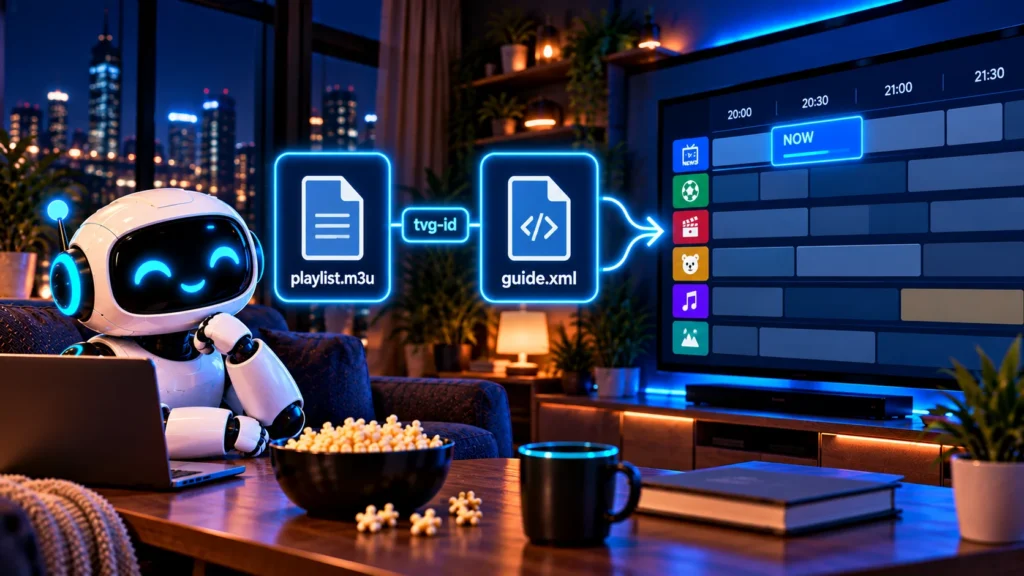
With IPTV, the guide is usually a separate file from the playlist. The playlist tells the player where each stream is. The EPG file tells it what is airing on each channel and when.
How an IPTV EPG Works
Most IPTV players read guides in the XMLTV format, a plain XML file usually called guide.xml (or guide.xml.gz when compressed). It contains two kinds of entries:
- Channels, each with an ID such as CNN.us or BBCNews.uk
- Programmes, each with a channel ID, a start time, an end time, a title and often a description
The player matches the two files using an ID. In an M3U playlist, each channel line can carry a tvg-id attribute:
#EXTM3U x-tvg-url="https://example.com/guide.xml"
#EXTINF:-1 tvg-id="ExampleNews.us" tvg-logo="https://example.com/logo.png" group-title="News",Example News
https://example.com/live/stream.m3u8
If the tvg-id in the playlist matches a channel ID in the guide, the player shows the schedule. The x-tvg-url at the top is optional. It tells players that support it where to download the guide automatically.
Where to Get a Free IPTV EPG
iptv-org EPG
The iptv-org/epg repository is the companion to the free iptv-org playlists. Instead of one ready-made file, it gives you tools to download guide data from hundreds of public TV listing sites and save it as an XMLTV file.
You need Node.js installed. Then run:
git clone --depth 1 -b master https://github.com/iptv-org/epg.git
cd epg
npm install
npm run grab -- --site=example.com
Replace example.com with one of the supported sites listed in the repository. When it finishes, the guide is saved as guide.xml. Useful options include:
| Option | What it does |
|---|---|
| –days=3 | Number of days of schedule to download |
| –lang=eng | Only keep channels in one language (ISO 639-2 code) |
| –maxConnections=10 | Download faster with parallel requests |
| –output=path/guide.xml | Choose where the file is saved |
| –gzip | Also create a compressed guide.xml.gz |
To use the file on other devices in your home, run npm run serve. The guide is then available at http://localhost:3000/guide.xml, or at your computer’s local IP address on port 3000 from another device on the same network.
Guides from your channel source
Free ad-supported apps such as Pluto TV, Tubi or Samsung TV Plus have their own built-in guides, so you do not need a separate IPTV EPG file for them. If you use a playlist from another legitimate source, check whether it already provides an XMLTV link.
How to Add an EPG to Your IPTV Player
The exact menu names differ from app to app, but the steps are almost always the same:
- Add your M3U playlist first and make sure channels play.
- Open the playlist or source settings.
- Look for a field called EPG URL, XMLTV, TV guide or EPG source.
- Paste the guide link (for example http://192.168.1.20:3000/guide.xml if you serve it from your computer).
- Save, then refresh or update the guide.
- Open the TV guide view and check that programs appear.
Large guide files can take a minute or two to load the first time. If your player lets you choose how many days to keep, two or three days is plenty and keeps the app fast.
Not every player shows guides. Basic players like VLC focus on playback, so if the guide matters to you, use a dedicated IPTV app with EPG support. You can learn more about playlist files in our guide to the IPTV M3U playlist.
Why Your EPG Is Empty or Wrong
| Problem | Likely cause | Fix |
|---|---|---|
| No guide at all | EPG URL not added or not reachable | Open the URL in a browser to check it loads |
| Some channels empty | tvg-id does not match the guide | Edit the playlist ID or map the channel in your app |
| Times are shifted | Time zone offset | Adjust the EPG time shift setting in your player |
| Guide stops after a day | Too few days downloaded | Grab more days or refresh the guide daily |
| App is very slow | Guide file is huge | Use a guide for your channels only, or fewer days |
Tips for a Fast, Accurate IPTV EPG
A good IPTV EPG should load quickly and show the right show on the right channel. These habits help:
- Grab only the channels you watch. A custom channels file keeps the guide small, so your player loads it in seconds instead of minutes.
- Keep two or three days of data. Most people never scroll further ahead, and a shorter guide refreshes faster.
- Use the compressed file when your player supports it. A guide.xml.gz file downloads faster than plain XML.
- Refresh the guide every day. Schedules change. If your player has an automatic EPG update setting, turn it on.
- Check the time zone once. If every program is shifted by the same number of hours, fix the time offset in your player settings rather than editing the guide.
- Match IDs carefully. When a channel shows no IPTV EPG data, compare its tvg-id in the playlist with the channel ID in the guide. One wrong letter is enough to break the match.
| Guide size | Typical load time | Best for |
|---|---|---|
| Under 5 MB | A few seconds | Phones, sticks and older TVs |
| 5 to 50 MB | Up to a minute | Most smart TVs and Android boxes |
| Over 50 MB | Several minutes | Computers and media servers |
If your IPTV EPG still feels slow after these changes, the bottleneck is usually the device. A guide that runs smoothly on a computer can be too heavy for a basic streaming stick.
Frequently asked questions
What is EPG on IPTV?
EPG means electronic program guide. It is the TV schedule that shows what is playing on each channel now and later. IPTV players usually load it from an XMLTV file.
How do I add EPG to IPTV?
Open your player’s playlist settings, find the EPG or XMLTV URL field, paste the guide link and refresh. Channels must have matching tvg-id values for the guide to appear.
Is there a free EPG for IPTV?
Yes. The iptv-org/epg project lets you build a free XMLTV guide from public TV listing sites. Many free streaming apps also include their own guides.
Why does my EPG show no information?
Most often the channel IDs in your playlist do not match the IDs in the guide, or the guide URL cannot be reached. Check both, then refresh the guide.
What is the difference between M3U and EPG?
The M3U playlist lists the channels and their stream links. The EPG lists the programs and times for those channels. The player combines the two.
Conclusion
An IPTV EPG turns a plain channel list into a real TV guide. Use XMLTV guide data, make sure your playlist’s tvg-id values match, and keep only the days you need. A well-matched IPTV EPG also makes large playlists much easier to browse.
To find channels worth adding a guide to, browse our full guide to IPTV channels, or see how the iptv-org GitHub playlists are organized.